
- Check your specific bank and account type before paying for automatic imports.
- Free expense tracking and a complete household budgeting system are different products.
- Shared wallets do not always include shared bank feeds or shared budgets.
- Compare annual costs, language options, and exports before committing.
If you’re Dutch, you need the best budgeting apps in the Netherlands to help you manage your expenses. Whether you want to understand where your money goes, set money aside, or analyze how you spent it each month, these apps give you detailed insights into your finances.
Our shortlist covers nine options from Holland, from automatic expense tracking to hands-on budgeting.
Best budgeting apps in the Netherlands at a glance
These recommendations are organized by use case.
The 9 best budgeting apps in the Netherlands reviewed
We reviewed some of the most popular and best apps in the Netherlands to help you understand what’s available and which best suits Dutch bank accounts.
Dyme: for spending data and subscription oversight
Dyme is a good budgeting app in the Netherlands if your main goal is that all you want to do is understand recurring costs. The app brings connected-account transactions into a single overview and shows how to manage subscriptions or negotiate bills.
We would shortlist it for someone who wants to identify forgotten payments before building a detailed spending plan. The app is free, but premium features require a paid subscription. The upside is that bank connections are possible for free. But the bill-negotiation service charges a percentage of successful savings, so it’s important to check the features before using it.
The main drawback for Dyme is that it’s not compatible with credit cards, but works well with regular Dutch debit cards.
iBilly (Grassfeld): for budgets and financial reports
If you are searching for iBilly, its former App Store listing now appears as Grassfeld. iBilly combines connected accounts, budgets, savings goals, as well as detailed PDF reports for investors. Light supports one bank connection; Premium+ expands the account allowance and sharing features. It could be useful for someone who wants to analyze their expenses, and we would consider it for someone who wants both spending analysis and planning in one place.
Grassfeld combines connected accounts, budgets, savings goals, and PDF reports. Light supports one bank connection; Premium+ expands the account allowance and sharing features. We would consider it for someone who wants both spending analysis and planning in one place.
In the Netherlands, iBilly can integrate with automatic savings accounts and credit-card connections, with manual records and paid import credit. This matters if much of your spending sits outside your current account.
MijnGeldzaken: for household administration
MijnGeldzaken is suitable for people who want a budgeting application for Dutch homes that connects to any major bank. It can act as a digital household ledger with bank transactions, categories, reports, and file imports. It has a free plan to get started, and if your household juggles multiple expenses, the account offers better features for budgeting at scale.
Its appeal is the ability to organize household finances in detail, rather than relying only on a spending chart. We would put it on the shortlist for those who review transactions and spending habits daily and want a reliable fallback.
The app is only in Dutch, so it’s not accessible to expats in the Netherlands.
Monefy: for easy manual logging
Monefy is our simpler option for people in the Netherlands who want to record purchases without connecting a bank. Its expense categories and visual summaries help turn individual payments into a picture of monthly spending. However, it does take time to record individual expenses, but the upside is that it can label expense types such as cash, cards, and bank balances. All without a live connection.
The trade-off is maintenance: missed entries produce an incomplete picture. Its budget feature also focuses on an overall limit rather than separate limits for every category. Optional paid features expand the free core.
Spendee: for visual tracking and shared manual expenses
Spendee combines spending categories, budgets, and wallets in a visual, easy-to-read dashboard. The basic plan includes one cash wallet and one budget. For paid plans, the app expands with new tools and bank connections, which are limited to Premium users.
If someone wants to track their own account and separately record household expenses, Spendee can do that. Or if someone goes on a short trip and wants to track expenses between partners, that’s also possible. Spendee’s shared wallets are manual, not shared bank-connected accounts.
We would not choose it for a household, assuming everyone would manage one automatically updated bank wallet.
Buddy: for shared budgeting on Apple devices
The Buddy app is good for tracking budgets across iOS devices, but that’s its only real upside compared to competitors. It does have the regular features like expense tracking and budget planning, and can be considered for households that want to participate in the same budget using Apple devices. Manual management is available, and its terms describe bank connections through Plaid and Salt Edge.
However, a connection provider’s name doesn't confirm that your specific Dutch account will work. To use it effectively, you must always verify the live bank section before paying or using it, since we can’t publicly verify the roster for Dutch bank apps.
YNAB: for planning how to use your money
YNAB is one of the strongest budgeting apps in the Netherlands, as readers can allocate money before spending it, making the tool easy to use and understand. The app has a wider reach and supports manual entries, but it also supports automatic imports from some Dutch banks.
That flexibility helps when an account cannot connect. One subscription can also cover a household through YNAB Together. The drawbacks are price and commitment. You still need to review transactions and maintain the plan. We wouldn't pay for YNAB to get an occasional spending chart.
Budgetbeheerder: for basic expense recording
Budgetbeheerder offers expense and income recording, categories, charts, receipt images, and reminders, and is easy to use. It suits someone who wants a simple record of daily spending and is willing to enter transactions. Receipt images can help explain a purchase when you review it later.
The published features we reviewed do not include bank feeds, statement imports, report exports, or household sharing. If any of those are essential, it's easier to recommend another option with documented support.
N26 — for budgeting inside your bank
N26 is a bank with built-in spending tools. Its Insights feature categorizes N26 transactions, while paid plans add tools such as Spaces and budgeting automations.
For an existing customer, this is worth exploring before adding another subscription. Your everyday account activity is already available, and you can review categories without maintaining a separate tracker.
The limitation is scope. Don't choose it expecting a verified combined view of ING, ABN AMRO, Rabobank, and ICS activity. Moving your banking is a bigger decision than downloading a budgeting app, and should only make sense if the account itself meets your needs.
Which budgeting apps work with Dutch banks and credit cards?
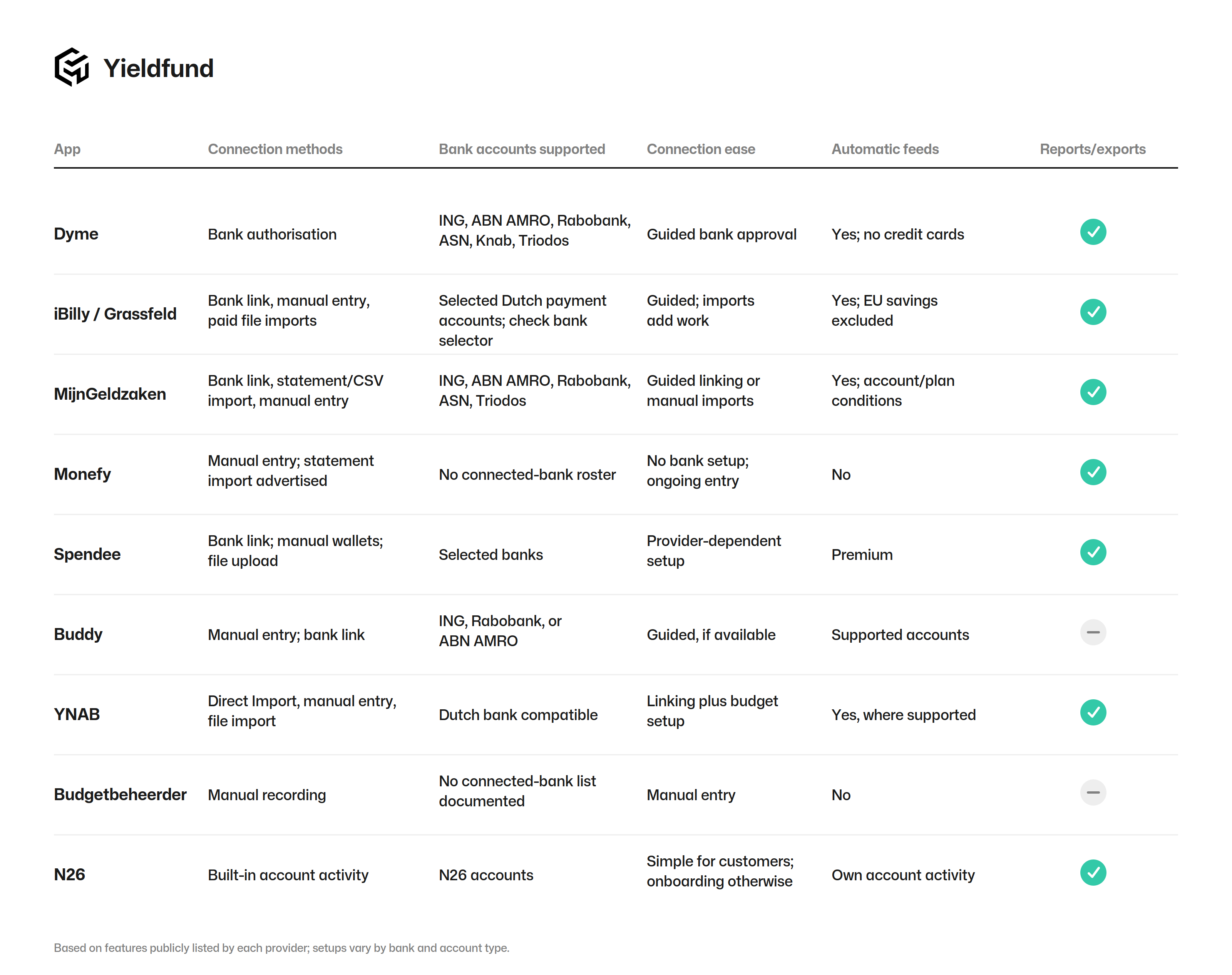
Bank support is account-specific. A provider may connect your current account but not its associated savings account or credit card.
The table separates automatic transaction feeds from manual entry and file imports. Supported banks are vendor-listed examples, not personally tested connections. Setup ease is an editorial assessment of the documented steps.
What to look for when choosing a budgeting app
When you choose a budgeting app in the Netherlands, it has to tick a few boxes to be useful. One of the more important features is bank integrations. You don’t want to waste time adding individual expenses or have to open two devices at once.
The second non-negotiable feature is categories and labeling. This means you know exactly where your money went and which category it fell into. This is crucial so you can have a better overview of what you’re spending on. AI features will soon become available and will make categorizing much faster.
Finally, the type of interface you’re dealing with. If you’re an expat, for example, you'll prefer English interfaces; otherwise, you may not enjoy the app. At the same time, the graphs and dashboard need to be easy to read without feeling complicated or heavy. There is only one app in our list that doesn’t include English.
How to connect budgeting apps to Dutch banks
Every app uses different connection methods, but the process is similar across the board. This means you have to open the app, confirm your bank is linkable, and approve the connection. Here’s a universal way to connect to budgeting applications in Holland.
- Open the app’s bank-connection menu and select the Netherlands.
- Find your bank and confirm the account type is supported.
- Follow the provider’s authentication process and review the requested permissions.
- Compare the imported transactions and balance with your bank.
- Check transfers, refunds, and card repayments before trusting spending totals.
Free vs paid budgeting apps. What are the costs?
- Dyme: the Dutch iOS listing shows Silver at €59.99 annually and Gold at €69.99 annually. Monthly options cost more over a full year.
- iBilly: Light is €21.99 annually; Premium+ is €43.99. Import credits cost extra.
- MijnGeldzaken: Brons is free; Plus Koper is advertised from €2.45 monthly. Check billing conditions.
- Spendee: Premium is priced at €39.99 annually or €6.99 monthly. Other purchase channels can differ.
- YNAB: US109annuallyorUS14.99 monthly, plus applicable tax. Twelve monthly payments total US179.88—US70.88 more than annual billing.
Monefy and Buddy offer optional paid upgrades, but the applications are free to use for Dutch users.
Is your existing bank app enough?
While we’re covering budgeting apps, banks now want to keep users in the same ecosystem and do provide detailed features to manage your budget. Take N26, for example, which has no monthly costs and provides basic overviews. Other banks like Bunq, ING, or ABN AMRO have limited budgeting features.
You can track or label your expenses, but you might not be able to do things like set up a budget, get reminders when you’re over your weekly budget, or track how many coffees you actually bought. Neo-banks like Revolut offer that, but they are different from ING or ABN.
Then, a separate app becomes more useful when you need multiple banks, imports, shared planning, or more detailed categories.
Which budgeting apps work best for households?
For a household that wants to plan together, we would start with YNAB or Buddy. YNAB Together includes up to six people under one subscription, with individual logins, while its Group Manager can access members’ plans, so discuss privacy before joining.
iBilly offers selective sharing of accounts, budgets, and goals. The owner needs the appropriate sharing plan, and both participants need subscriptions. Include both subscriptions in your comparison.
Monefy supports synchronizing data across devices through a shared cloud account; that is different from separate household permissions.
Do you want to track spending or plan it in advance?
Tracking answers, “Where did my money go?” Planning answers, “What does this money need to cover?”
Monefy suits the first task. YNAB is designed around the second. If you only want a clearer overview, a simpler tracker may be sufficient. If you repeatedly overspend despite knowing your totals, allocating money beforehand may be more useful.
Connecting safely to budgeting apps
Before you connect any app, read the permissions. That way you’re not approving any connections that could hurt your account. And what’s even more important is to download applications only from trusted sources such as the App Store or Google Play. That way you’ll minimize security risks by almost 99%.
Check the named connection provider and its regulatory registration. De Nederlandsche Bank (DNB) explains that consent-based access is subject to licensing requirements in the Netherlands or another EU member state.
Use a unique password, enable additional authentication if offered, and review household access. If you want to stop using the app, revoke the connection and separately check its data-deletion process.
Which budgeting apps are not suitable for Dutch residents
For Dutch residents, what’s most important is that the applications can connect and feed data from their bank accounts. We listed some of the more popular applications in Holland, but there are several applications with global reach that aren’t really suitable in Holland.
Here are some that don’t fit the needs of budgeting people in the Netherlands:
- Monarch: The application is big in the US and Canada but doesn’t connect or integrate with Dutch or EU bank accounts.
- Grip: Has some limitations, especially for ABN AMRO users, since the app stopped offering and supporting it as a standalone app on 16 December 2022.
FAQ
Can I budget without linking my bank?
Yes. Monefy and Budgetbeheerder support manual expense recording, while YNAB and Spendee also offer workflows lacking bank connections. You will need to enter transactions or use supported file imports, then reconcile your records with account balances regularly.
Which applications have English interfaces available?
English is listed for Dyme, iBilly(Grassfeld), Monefy, Spendee, Buddy, YNAB, Budgetbeheerder, and N26. MijnGeldzaken is the only app that doesn’t offer a Dutch interface on iOS.
About the authors

Written by
Vlad Hategan
SEO content writer
Writes the articles in the Yieldfund knowledge base.
Dutch, English, Romanian

Translated by